Hi. After updating to the newest version of NetDrive 3, I get the following message when trying to connect:
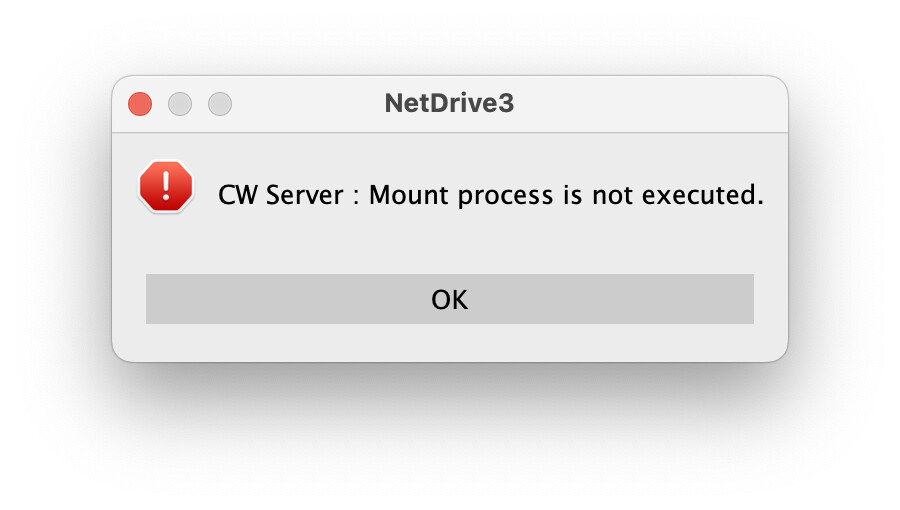
I downloaded an earlier version and it works fine. Any ideas why?
Hi. After updating to the newest version of NetDrive 3, I get the following message when trying to connect:
I downloaded an earlier version and it works fine. Any ideas why?
Dear tomas2,
Thank you for reaching out.
This error usually occurs when the mount process fails to start correctly.
To identify the exact cause, please send us your log files for analysis.
Please follow these steps to collect the logs:
Once we receive the logs, we’ll analyze them and get back to you with further instructions.
Best regards,
NetDrive Support Team
Archive.zip (912.8 KB)
Dear tomas2,
From the logs you shared, the mount is failing because the ndfuse kernel extension (kext) required by NetDrive is not being loaded by macOS. Please follow the steps below:
kextstat | grep ndfuse
No output means it isn’t loaded.
sudo kmutil load -p /Library/Filesystems/ndfuse.fs/Contents/Extensions/13/ndfuse.kext
Then verify again:
kextstat | grep ndfuse
/Library/Filesystems/ndfuse.fs
/Library/LaunchDaemons/com.bdrive.ndfuse.load.plist  (if present)
~/Library/Logs/NetDrive3/
If the issue persists after these steps, please send us the new VERBOSE logs (zipped) and we’ll investigate further.
Best regards,
NetDrive Support Team
Still nothing, even after a clean install.
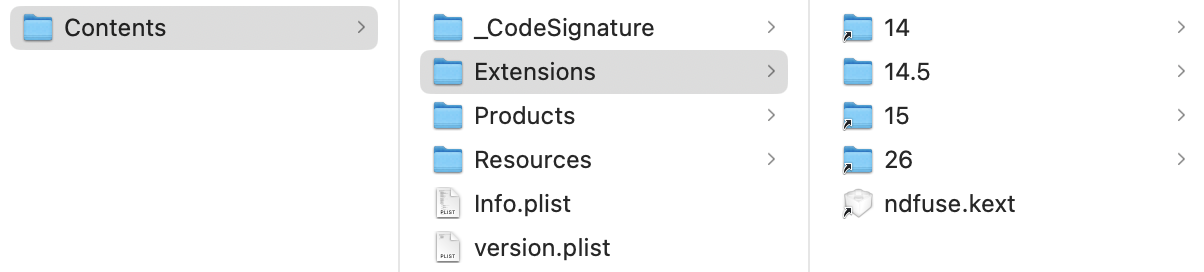
I noticed that you direct kext to load from extension 13, but in my ndfuse.fs there is no 13 folder, only 14 and above (even after a clean install):
Maybe this is the problem?
New logs attached as well:
Archive.zip (3.6 KB)
Hello,
Thank you for the screenshot — that actually explains the situation.
From your logs macOS is 13.7.1, and NetDrive tries to load the kext from:
/Library/Filesystems/ndfuse.fs/Contents/Extensions/13/ndfuse.kext
But on your machine there is no 13 folder, only 14, 14.5, 15, 26, etc.
So NetDrive is looking for a versioned kext directory that doesn’t exist, and that’s why the mount fails.
So yes — this mismatch is very likely the problem.
We need to fix the package / loader side to point to the correct folder for macOS 13.
As a temporary workaround, could you please try this:
13 folder and copy the kext from 14 into it:sudo mkdir -p /Library/Filesystems/ndfuse.fs/Contents/Extensions/13
sudo cp -R /Library/Filesystems/ndfuse.fs/Contents/Extensions/14/ndfuse.kext \
/Library/Filesystems/ndfuse.fs/Contents/Extensions/13/
sudo kmutil load -p /Library/Filesystems/ndfuse.fs/Contents/Extensions/13/ndfuse.kext
This is only a workaround — we will review the macOS 13.x kext path in our build so that you won’t need to do this manually in the future.
Thank you for spotting this and for your patience.
Best regards,
NetDrive Support Team
It is great we are nearing the solution. I tried the workaround but it did not work. Logs attached. Thank you for looking into this!
Archive.zip (12.0 KB)
Hi,
Thanks for sending the logs. After checking them, we found the actual cause.
NetDrive tries to load the kext from:
/Library/Filesystems/ndfuse.fs/Contents/Extensions/13/ndfuse.kext
because your macOS version is 13.x (Ventura). However, on your Mac there is no 13 folder — you only have 14, 14.5, 15, 26 — so the kext load always fails, and the mount ends with error 2008. That’s why the workaround you tried did not change the result. NetDrive is still looking at the non-existing “13” path.
We need to fix the installer/build on our side so that the correct kext for macOS 13 is installed and loaded.
Sorry for the inconvenience, and thank you for helping us narrow this down.
Best regards,
NetDrive Support Team
Glad we got there. Hoping for a fix soon.
This topic was automatically closed 60 minutes after the last reply. New replies are no longer allowed.
Hi,
We’ve prepared a new build that supports macOS 13.x.
Please download and check it using the link below:
Let us know if you encounter any issues.
Thank you.