When I am trying to copy a file from Windows local disk to NetDrive backed by GoogleDrive and a file with the same name already exists on the network drive (an earlier copy), I often see message from Windows Explorer “There is already a folder with the same name as the file name you specified”.
Hello,
Thank you for contacting NetDrive Support.
First, please update NetDrive to the latest version and check whether the same issue occurs again when copying the file.
 Latest version download link:
https://downloads.bdrive.com/netdrive/builds/aebc604e3f0d43c58e47f57366ac3e99/NetDrive3_Setup-3.18.1166.exe
If the issue still occurs in the latest version, please send us the following log files so that we can investigate further:
- ndagent log
- nd3svc log
Once we review the logs, we will provide more detailed guidance.
Best regards,
NetDrive Support Team
I installed 3.18.1166.
Now Explorer no longer displays the message but instead of overwriting AAA.docx
it creates
AAA - Copy.docx
AAA - Copy (2).docx
and so on.
What is the location of ndagent.log ?
Hello,
This is the NetDrive Support Team.
Thank you for testing the updated version and for sharing the details.
We have tested the same scenario on our side.
When uploading a file with the same name, Windows Explorer normally shows a “Replace or Skip Files” dialog, as expected.
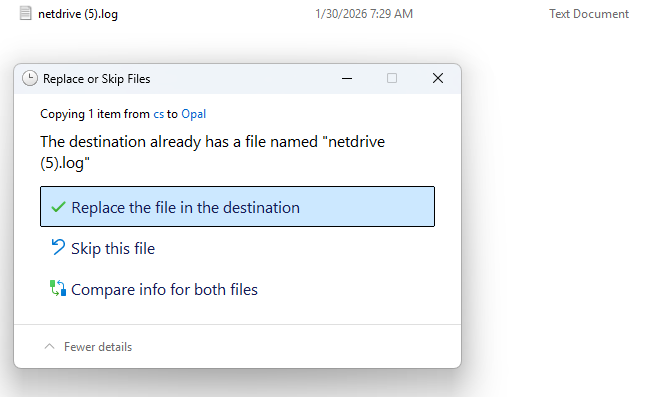
However, in your environment, instead of overwriting the existing file,
NetDrive is creating files such as AAA - Copy.docx, AAA - Copy (2).docx.
This behavior can occur when:
- Windows sends an overwrite request, but NetDrive interprets the situation as overwrite not allowed
- There is a mismatch in how file existence or file locking is detected between Explorer and NetDrive
- NetDrive internally falls back to copy mode instead of overwrite
To identify the exact cause, we will need to review the logs.
Log request
Please send us the following log file(s), preferably right after reproducing the issue:
Please collect the logs using the steps below.
- Launch NetDrive
- Stop any running jobs if applicable
- Open Settings
- Set Log Level to VERBOSE
- Try connecting again
- In Settings, click Open log folder
- Attach and send the log files
Once we review the logs, we will let you know whether this is an environment-specific issue or a bug that needs further adjustment.
Thank you for your cooperation.
Best regards,
NetDrive Support Team
This topic was automatically closed 7 days after the last reply. New replies are no longer allowed.