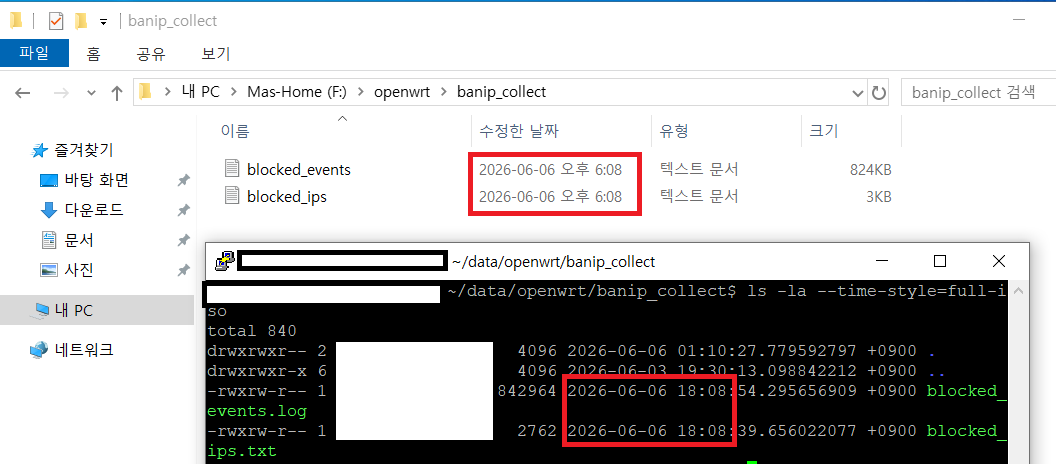
I found what appears to be a timestamp/timezone issue when connecting to an SFTP server using NetDrive.
Environment:
NetDrive Version: 3.19.14
Windows Version: window10 22H2(19045.7291)
Protocol: SFTP
Server OS: Debian
Server Timezone: Asia/Seoul (UTC+9)
Server file timestamp:
Modify: 2026-06-04 01:45:06 +0900
Linux verification:
timedatectl
Time zone: Asia/Seoul (KST, +0900)
However, NetDrive displays the file modification time as:
2026-06-03 16:45:00
This is exactly the UTC time corresponding to the server timestamp.
It appears that NetDrive may be displaying SFTP file timestamps in UTC instead of converting them to the local Windows timezone.
Additional information:
The “Use server time for files/folders” option is enabled.
When this option is disabled, the displayed timestamps differ even more from the actual file modification time.
Therefore, enabling this option improves the displayed time, but the timestamp is still exactly 9 hours behind the server’s local time.
Server verification:
timedatectl
Local time: Thu 2026-06-04 01:50:42 KST
Time zone: Asia/Seoul (KST, +0900)
stat blocked_ips.txt
Modify: 2026-06-04 01:45:06.376168726 +0900
Could you please confirm whether this is expected behavior, a configuration issue, or a bug?
Thank you for reaching out and providing such detailed information about your environment and the troubleshooting steps you’ve already taken.
To help our development team investigate this issue thoroughly and determine if this is a bug or a specific configuration conflict, we need a bit more diagnostic data from both NetDrive and your server.
Could you please provide us with the following logs and listings?
1. NetDrive Debug Log
Please reproduce the issue and generate a debug log from NetDrive by following these steps:
Open NetDrive and go to Settings.
Set the log level to Debug.
Disconnect and reconnect your SFTP drive.
Browse to the folder containing blocked_ips.txt so NetDrive requests the file listing.
Attach the log file to your reply. You can find the log file using ‘Log’ menu item of your SFTP drive.
2. Server-Side SFTP File Listing
To verify exactly how the SFTP subsystem on your server is transmitting the file attributes, please run the following command on your server and send us the output:
ls -la --time-style=full-iso /path/to/your/folder/blocked_ips.txt
(Please replace /path/to/your/folder/ with the actual path to the file)./path/to/your/folder/
Once we have the debug log showing the raw SFTP responses and the precise server listing, we will be able to pinpoint exactly where the 9-hour offset is being introduced.
Thank you for your patience and for the detailed diagnostics — they were a great help in pinpointing this.
We identified the root cause. On SFTP, NetDrive was reading the file modification time from the server’s directory listing text (ls -l style), where
the time is shown in the server’s local timezone — but NetDrive was interpreting it as UTC. Combined with the “Use server time for files/folders”
option, this caused the timestamp to be off by your timezone offset (9 hours).
We have fixed this. NetDrive now automatically detects the server’s timezone offset and applies it, so timestamps match the server’s local time.
Could you please test the following build and let us know the result?
Install 3.19.21 (installing over your current version is fine).
Reconnect your SFTP drive.
Browse to the folder containing blocked_ips.txt.
Confirm the modification time now matches the server’s local time (e.g. 2026-06-04 01:45).
A couple of things to expect (current known limitations):
The time is corrected to the minute. The seconds may show as :00, because the SFTP directory listing does not include seconds.
For files older than ~6 months, the time may show as 00:00. This is because the SFTP listing omits the time-of-day for old files and only shows the
date. We are working on a further improvement for this. Your blocked_ips.txt is recent, so it should display correctly.
If the time still does not match after updating, please send us a new debug log (same steps as before) and we’ll investigate further.
Hello NetDrive Support Team,
Thank you for your quick response and for investigating this issue so thoroughly.
I tested NetDrive 3.19.21 using the build you provided, and I am pleased to confirm that the timestamp issue has been resolved. The modification times now correctly match the server’s local time, including the files that previously showed a 9-hour offset.
I really appreciate the effort your team put into identifying the root cause and providing a fix so quickly. Thank you as well for keeping me informed throughout the troubleshooting process.
Thank you again for your excellent support and for resolving this issue so promptly.
Best regards,
That’s wonderful to hear — thank you for confirming, and for your patience and excellent cooperation throughout the troubleshooting process. Your
detailed diagnostics made it much easier for us to pinpoint the root cause.
We’re glad the modification times now correctly match your server’s local time. This fix will be included in an upcoming official release.
If you run into anything else, please don’t hesitate to reach out. Thank you again for helping us identify and resolve this issue!